 Lookward
See every app on your network, from the DNS you already run.
Lookward reads the lookups your Windows domain controllers already answer and shows, live, which apps are in use at every school or office, on which devices, and which ones you haven't approved. No proxy, no endpoint software, no new appliance.
Runs on your own server. Ubuntu, Debian, macOS or Docker. No card needed for the trial.
Knows the apps your network actually runs on, including
One lookup in. The whole picture out.
Every app a device opens starts with a DNS question to your domain controller. Lookward collects those questions, recognizes the app behind them, and puts it on the map.
The agent reads the DNS log
10/3/2026 9:41:07 AM 0F1C PACKET
UDP Rcv 10.61.1.28  0007 Q
[0001 D NOERROR] A
(3)www(6)tiktok(3)com(0)
A small PowerShell scheduled task turns on DNS debug logging for incoming questions only, and sends new lines to your Lookward server every second (over HTTP, or HTTPS once you turn it on). Nothing is installed on devices.
Each lookup becomes an app, a device and a site
About 315 apps are built in, with a category, a risk level and your approval status. Background noise like OS updates, ads and CDNs is filtered out.
You see it live, and keep the record
A filterable live feed, a TV map of every site, History you can search, and compliance reports with a fingerprint you can verify later.
Click through the console
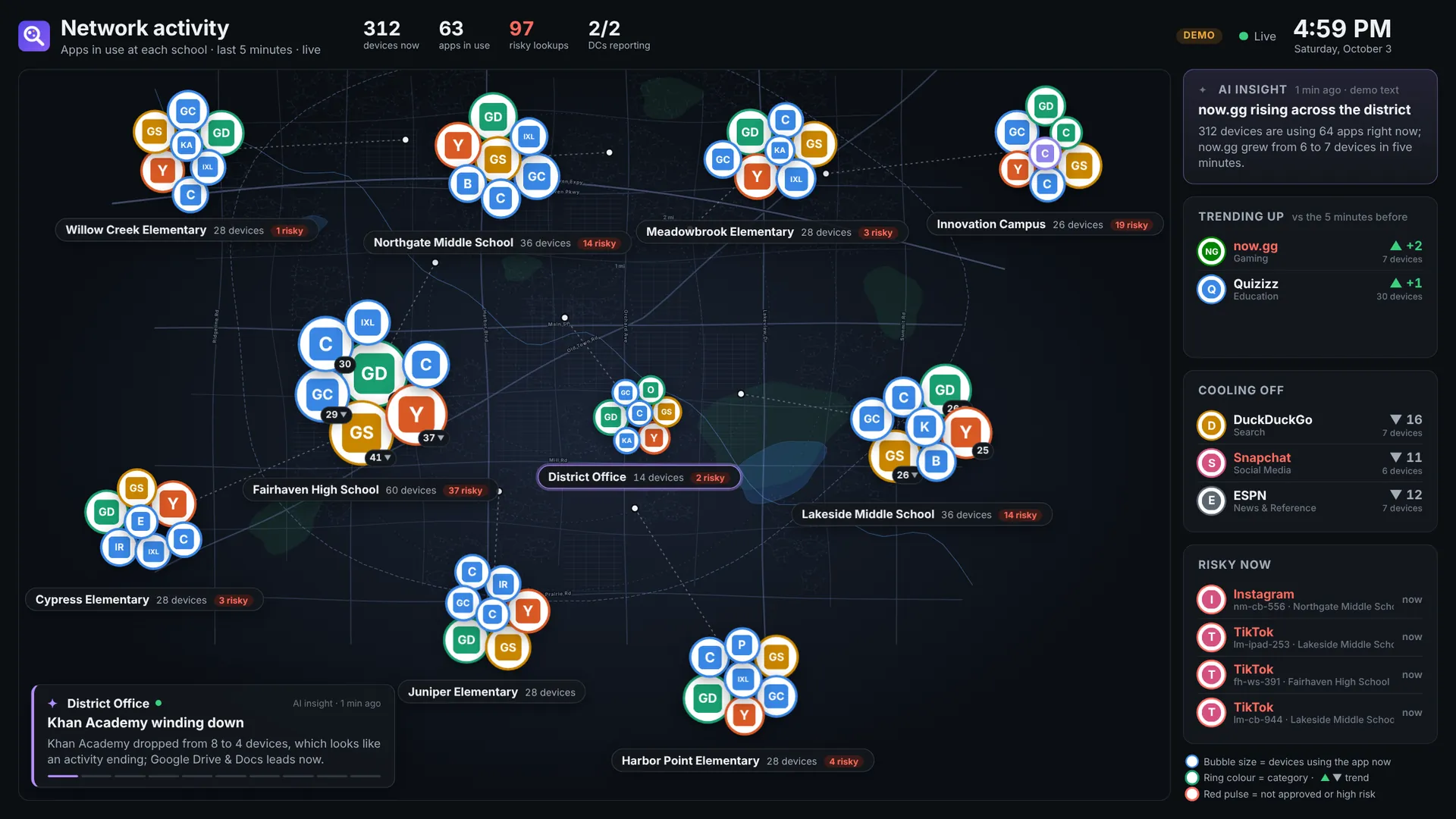
Real screens from Lookward's demo mode: a fictional school district with ten schools and two simulated domain controllers. Pick a stop, then tap the numbered markers.
Shadow-IT visibility without a cloud proxy
Everything below is in every plan, and on during the trial.
Live feed
App activity as it happens, with device, site, app icon and domain. Filter, group repeats, pause, export CSV.
Risky activity
Apps you haven't approved, high-risk apps, and the proxies, VPNs, encrypted DNS and Private Relay that slip past the web filter.
Discovery
Domains the catalog doesn't know yet, ranked by how many devices use them. One click adds them to an app, a new app, or the noise list.
TV mode
A view-only wall display: every site on your street map with a bubble per app, trending up, cooling off and risky now.
Compliance reports
PDF and CSV for any period and scope, with an ID and SHA-256 fingerprint in an append-only register. Email or schedule them.
History
Search two weeks of app lookups (or as long as you choose) by device, app, category, site or domain.
Roles, SSO and audit
Viewer, analyst and admin roles, two-step sign-in, Microsoft Entra ID or Google sign-in, and a full audit log of who looked at what.
AI insights (optional)
Plain-English captions on the TV, written by Claude from aggregate counts only. Bring your own API key; off by default.
Signed updates
Releases are signed. Install with one click, or let them install themselves in a maintenance window, with a data backup and automatic rollback. Offline update files for air-gapped servers.
Made for the wall in the tech office
Open one link on any smart TV or signage player. It signs that screen in as view-only for 30 days, scales from 720p to 4K, and needs no mouse or keyboard.
- Your streets, your schools. Lookward builds a street map of your area from OpenStreetMap once, then works offline.
- Bubbles that breathe. Size is how many devices use an app right now; rings show the category, a red pulse means risky.
- Safe for shared spaces. Hide device names, or risky activity, per screen or for every TV.
&tour=15 visit each school in turn&pages=map,overview rotate pages&anon=1 no device names on that screenA record you can hand to the board, and prove later
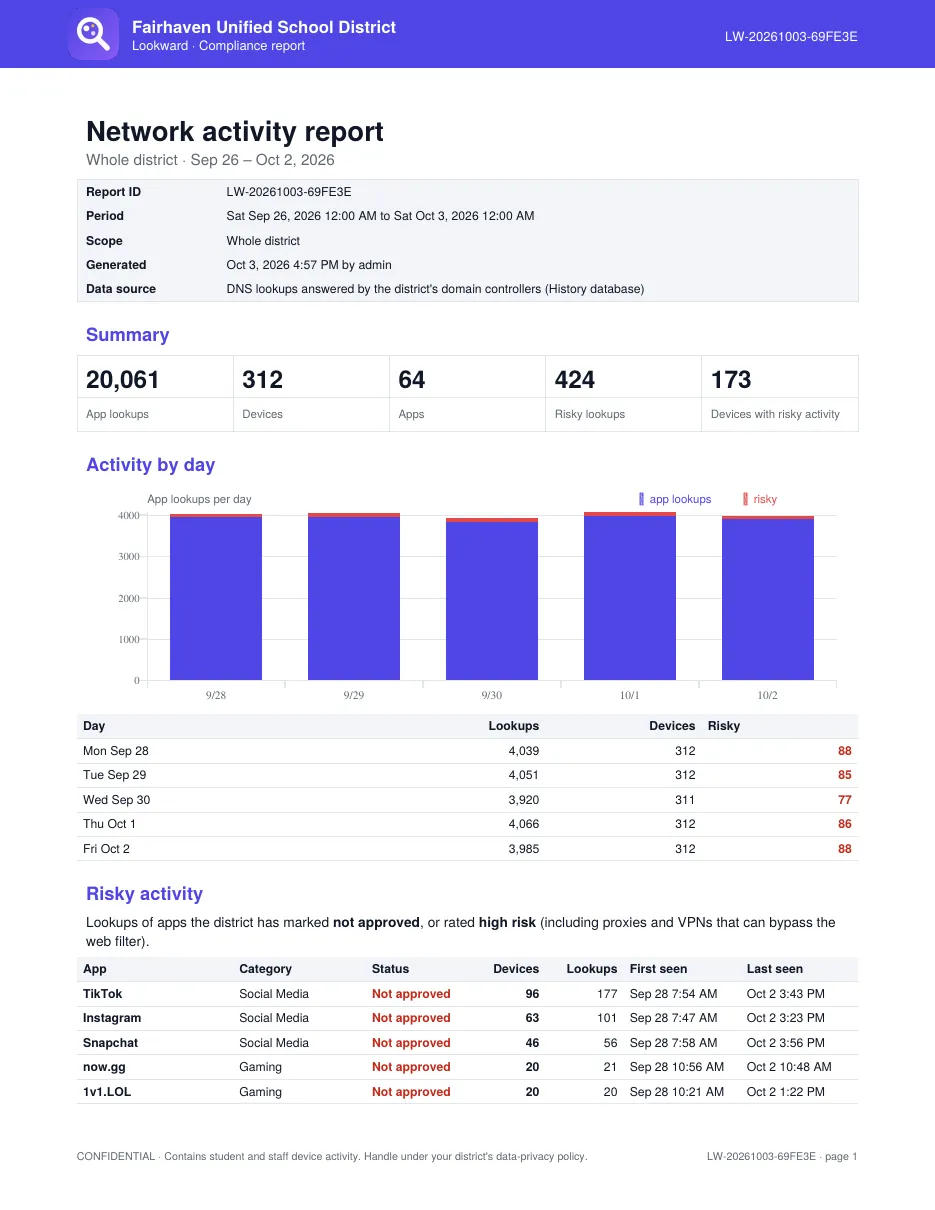
Pick a period and a scope (the whole organization, one school, one device, one app or one category) and Lookward writes a PDF for reviewers and a CSV of the underlying lookups.
- Every report gets an ID and a SHA-256 fingerprint in an append-only register.
- Drop a file on Verify a report months later to confirm it's unaltered.
- Your name and logo on every page, with a confidentiality line.
- Scheduled daily, weekly or monthly, by email.
sha256 e5ed27d5654d888e65f01f157989c33abd1f1b1a495048a03c7d39e9f9e7a4c1Clear about what it sees
DNS shows which services a device reached, not what it did there. That's exactly enough to know what's in use, and it's why Lookward needs nothing on your devices.
✓Lookward can tell you
- Which apps and services are in use, at which site, on which device, and when.
- How many devices use each app right now, and whether that's rising or falling.
- Apps you haven't approved, and devices using proxies, VPNs or encrypted DNS to get around your filter.
- New services nobody has categorized yet.
–It can't, and doesn't try to
- See page contents, videos watched, messages or search terms.
- Block anything. Use it alongside your web filter, not instead of it.
- See devices that use their own DNS or a VPN (it flags them instead).
- Count exact page views: devices cache answers, so one lookup can stand for many.
From a fresh VM to a live map before lunch
- Paste one line on a server. Ubuntu 22.04/24.04, Debian 12 or macOS 12+; 2 vCPU and 4 GB RAM cover a few thousand devices. Or
docker compose up -d. - Open the setup wizard. Administrator, organization, license, your sites with their subnets and map locations (or import a CSV).
- Run the agent on each domain controller. The wizard gives you the download and the exact command, token included. DCs appear as they start reporting.
Coming from the DNS Query Console? sudo ./install.sh --migrate-from /opt/dns-console keeps your history, accounts, agent token and TV links.
# the one line from your trial email
$ curl -fsSL https://lookward.app/i/<your-code> | sudo bash
Downloading Lookward 1.0.0
Checksum OK
…
✓ Lookward is running

  Open:        http://10.10.0.20:8081/setup
  Setup code:  7F2A-C41E-9B03

# then, on each domain controller (elevated PowerShell)
PS> .\install-agent.ps1 -ConsoleUrl http://10.10.0.20:8081 -Token …
# it shows up in Settings → Domain controllers within seconds
Anywhere one IT team looks after many sites
K-12 districts
See which learning apps are actually used at each school, catch TikTok and proxy use, and answer the board with a report instead of a guess.
Colleges
Campus-by-campus app use on staff and lab networks, with roles that keep student-level detail to the people who need it.
Multi-site businesses
Shadow IT and unapproved AI tools across offices, clinics or branches, without routing traffic through a cloud proxy.
MSPs and resellers
Run it for your clients under your own name, colors and support contact with white-label branding.
Student data stays on your server
Lookward is installed on infrastructure you control. Lookups, history and reports never leave it, and we can't see them. The full detail is in the Security & Architecture overview for your review.
Self-hosted, no cloud copyThe only call home is the optional update check every few hours: version, channel and license ID.
Read-only, outbound-only on the DCsThe agent reads the DNS debug log (incoming questions only) and posts to your server. Nothing listens on the DC, and uninstalling restores your DNS settings.
Retention you setHistory expires on its own (14 days by default). Report files are kept a year, fingerprints forever.
Everything is auditedSign-ins, searches, device look-ups, exports, reports and settings changes, downloadable as CSV.
Privacy controls for shared screensPer-TV or global switches for device names and risky activity; the server stops sending what a screen shouldn't show.
AI only sees countsIf you turn on AI insights, only aggregate per-site counts, your organization's name and the local time are sent, with your own key. Never device names, addresses or individual lookups.
Your name on the console, not ours
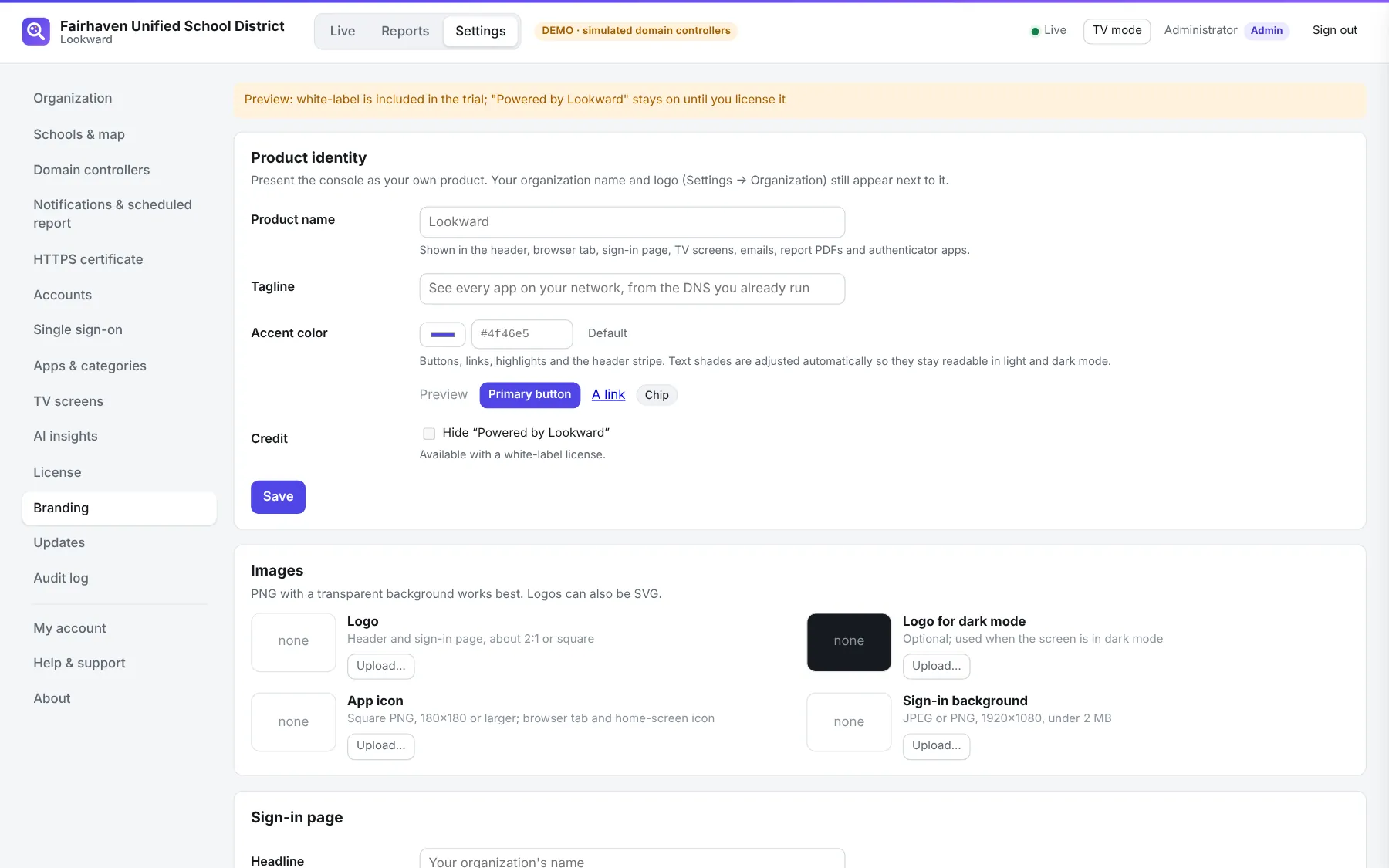
On Enterprise and Partner licenses, the console, sign-in page, TVs, emails and report PDFs carry your product name, colors, logos and support contact. Try it during the trial; it previews with a small "Powered by Lookward" until you license it.
Priced per site, not per device
A site is a school, a campus building or an office. Every plan includes every feature, updates and email support. Buy online by card, or pay by purchase order.
Education
K-12 districts, colleges, universities and nonprofits.
- Unlimited devices and domain controllers
- Compliance reports and History
- TV mode, SSO, two-step sign-in
Business
Companies, clinics and public agencies with several offices.
- Everything in Education
- For companies, clinics and agencies
- Purchase orders and invoices welcome
Enterprise & Partner
Large districts, state networks, MSPs and resellers.
- White-label branding
- Volume and multi-year pricing
- Partner licenses for your clients
Prices in US dollars. More than 40 sites? Request a quote for volume pricing.
Asked by network admins
Do I need to install anything on Chromebooks, iPads or laptops?
No. Devices already ask your domain controllers for every name they connect to. Lookward only needs a small agent on each DC (a PowerShell scheduled task) and one Linux, Mac or Docker server.
Which DNS servers does it support?
Windows Server DNS on domain controllers, Windows Server 2016 or newer. If your devices use a different resolver (Infoblox, BIND, a firewall), tell us: it's on the list.
Will DNS debug logging slow my domain controllers down?
The agent logs incoming client questions only, to a capped file (200 MB by default), and saves your previous settings so uninstalling puts them back. On very busy DCs, watch CPU and disk for the first day; most never notice.
What about devices using encrypted DNS, VPNs or iCloud Private Relay?
Their lookups don't reach your DCs, so Lookward can't see what's inside, but it does see them reaching DoH providers, VPNs and Private Relay, and lists that as risky activity.
Does it block apps?
No. Lookward is for visibility and reporting. Keep using your web filter; Lookward shows what gets past it and what people actually use.
What happens when the trial or license ends?
The live view and TV screens keep working. History, reports, exports and AI insights pause until a license key is entered. Nothing is deleted.
Can I add apps the catalog doesn't know?
Yes. Uncategorized domains are listed by how many devices use them; one click adds a domain to an existing app, a new app of your own, or the noise list. You set approval and risk per app.
Is it FERPA and privacy friendly?
Lookward runs on your server, so lookups and reports stay under your control and your policies. It has roles, an audit log, retention limits and privacy switches for TVs. We never receive device or browsing data. See the security overview.
What counts as a site?
Each school, campus building or office you add in Settings, with its own subnets. The district or head office counts as one if it has devices. The trial covers up to 100.
Do you take purchase orders?
Yes. Request a quote below and we'll reply within one business day with a quote you can turn into a PO, plus a W-9 if you need one.
Try Lookward on your own network
We'll email you a one-line install command. Every feature is on for 30 days, for up to 100 sites. No card, no sales call unless you ask for one.
- Want a look first? Open the live demo, or run
./run.sh --demofrom the download on any machine with Python. - Questions? sales@lookward.app. A person answers.